User Help
This Bathymetry Viewing and Download service provides bathymetric data products for the geo-professional. It assumes that the user has a basic familiarity with geo-spatial tools and terminology.
The EMODnet digital terrain model (DTM), on which all products in this service are based, has been created at a resolution of 0.125 arc-minutes using the best available bathymetry from a variety of sources. There are still a lot of areas where no high quality bathymetry is available. To prevent gaps in the EMODnet DTM layer, these areas have been filled with the GEBCO 2014 data.
Although the bathymetry available is based on the best available bathymetry and every effort is made with respect to the quality assurance and quality control, it should be noted that, accuracy, completeness, reliability, usability or suitability of the bathymetry cannot be guaranteed. Therefore the data products available from this service are not to be used for navigation or for any other purpose relating to safety at sea. EMODnet assumes no responsibility for incorrect results or damages resulting from the use of the data.
Browser support is given from Firefox 35, Chrome 40, IE 11, all under Windows 7 and 8, and Safari 7.1, Firefox 35, Chrome 40 under OS X. Older browsers might experience problems due to the used technologies.
Table of Contents
- What the Bathymetry Viewing and Download service provides
- Using the service
- Using the Data Product
- The Source references layer
- The Survey tracks / polygons layer
- Downloading Products
- Personal Layer
- WMS services
- Colophon
- Questions & Feedback
- Configuration information
What the Bathymetry Viewing and Download service provides
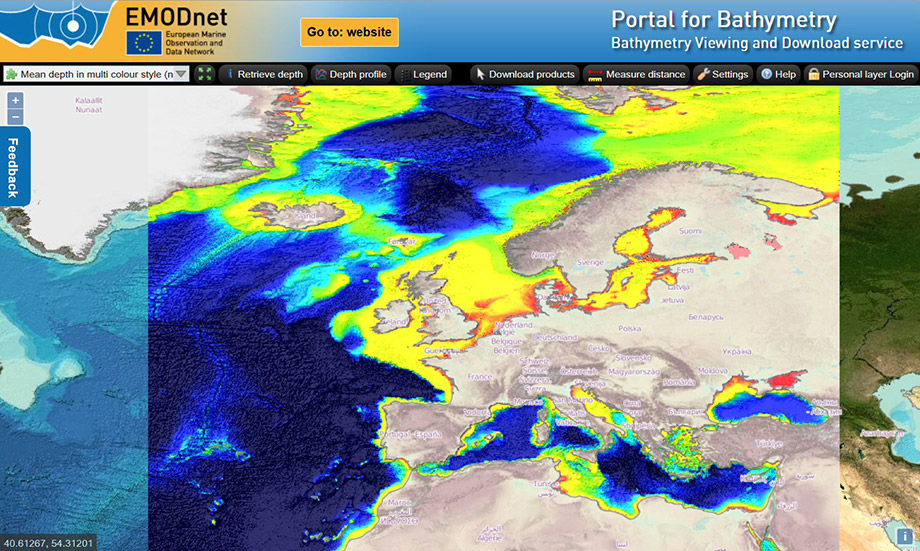
This service provides bathymetric data products for the area specified by the EMODNet project. This covers the Norwegian Sea, Icelandic Sea, Celtic Seas, North Sea, Kattegat, Baltic Sea, English Channel, Bay of Biscay, Iberian Coast, West and Central Mediterranean, Adriatic Sea, Ionian Sea, Aegean Sea, Levantine Sea, Sea of Marmara, Black Sea, the Azores, Canary Islands and Madeira. The data product is provided in one eight arc minute grid, so data points are roughly 230 meters apart.
The bathymetric data product can be downloaded in different formats. Currently the following formats are supported: native EMODnet csv, ASCII xyz, Esri ASCII grid, EMODnet NetCDF, GeoTIFF and QPS SD (Fledermaus). The EMODnet csv and NetCDF files are available with and without GEBCO and interpolated (INT) values. The download is divided over 16 tiles. Apart from downloading bathymetric data products the service provides information regarding point depth, transects and meta data of the underlying surveys. The survey data itself are not directly available but the related EMODnet Bathymetry CDI Data Discovery and Access service provides facilities for identifying and requesting access to survey data sets. The EMODnet bathymetric data product is based on survey data and composite digital terrain models of hydrographic organizations and research institutes (a complete overview of the contributing organizations and partners can be found at the EMODnet bathymetry website). There are areas that are not covered by these surveys or composite DTM"s. These areas have been filled with data available from GEBCO 2014.
The Bathymetry Viewing and Download service also provides a source references layer with metadata for the detailed survey data and composite DTM"s as used for the EMODnet bathymetry data product.
Using the service
Using the service will address the layer panel, adding a layer yourself and using the available tools in the user interface.
Use interface layout
The service provides essentially a bathymetric map. There are several layers and these layers, when activated, can have specific functions which are displayed in the top bar by buttons.
Layers panel
The layers panel is the main control for choosing what kind of information you would like to examine. Although many layers can be made visible at the same time, only one layer can be active. The active layer determines the behaviour and corresponding functionality. The layer list can be selected by clicking on the down arrow of the left selection list in the function bar. Every layer has the following properties:

- Active (radio button):
To activate a layer click the corresponding radio button. The other active layer will be deactivated, but will still be visible. The activated layer will also be made visible - Name:
The name indicates the use of the layer. Hovering over the icon will show a tool tip text explaining the layer - Remove:
User added layers can be removed by clicking the X. Predefined layers can not be removed - Visible:
By clicking the checkbox a layer can be made visible. If a layer can be seen when it has a checkmark depends on its position in the layer order and the opacity settings of the other layers. The layer in the top of the list is also the layer on top of all the other layers. To prevent performance degradation make sure that only layers that make sense are set to visible. Layers completely masked by other layers but with visibility set, still require processing time. - Opacity:
By using the slider bar the opacity of the layer can be influenced. When the slider is moved to the far left the layer is no longer visible. - Change layer order:
The ordering of the layers can be changed by dragging and dropping of the layers in the layer panel.
Adding a layer
In addition to the available layers you can add layers yourself. Click on Add layer to initiate the process of adding a WMS layer. Complete the following steps:
- Enter the URL of the WMS server providing the required layer e.g. http://geoserver_name/subpath
- The next pop-up will show the available WMS layers. Select the required layer(s)
- Complete adding the layer by entering a name. If the selected WMS layer provides transparency check the tick-box. If the WMS layer doesn"t support transparency you can set the opacity. If neither transparency or opacity are set, the added layer will block all underlying layer from being visible
- If required change the layer order. The layer above another layer in the list has precedence over the layer under it. When changing the layer order the result will be immediately shown.
Make sure the added layer is based on WGS84. WMS Layers based on projections are not supported.
Using the general tools
The following tools are available:
- Pan tool:
Panning of the map can be done by keeping the left mouse button active and then moving the mouse in the required direction. - Zoom tool:
Zooming in and out can be done by turning the mouse wheel forward and back. Other option is to use the 2 buttons with + and - on the left top corner of the map. - Zoom to selection:
Pushing the Shift key and drawing a lat - lon box with the mouse with the left button active will zoom in the map to the selected area. The zoom to selection uses predefined zoom factors. Therefore the area actually zoomed in to might differ from the drawn zoom rectangle - Measure distance:

Click on the measure distance tool to measure the distance of a line. The line can be defined by clicking once on the map and dragging the mouse. Double click to define the last point of the line - Help tool:

Clicking this button will open the Help pages - Restore tool:

Clicking on this button will restore the map giving the EMODnet coverage area. - Download products tool:

Clicking this button allows you to select and download EMODnet Bathymetry DTM tiles in various formats. This is explained in more detail below. - Personal layer login:

Clicking this button allows you to enter the Personal layer functionality. This is explained in more detail below. - Map setting:

Click on the map settings to change the way the coordinates are formatted and if the depth has to show as a positive or negative value. There is also projection field available, but only WGS84 is available
Then depending on the active layer additional tools and functions will be available. These tools and functions will be explained below in the context of specific layers.
Continuing from the last session
If your browser supports HTML5 storage the user defined WMS layer(s) and predefined WMS layer settings as well as the zoom level and pan position are stored. When starting a new session the portal will be initialized with these settings. When a browser option like clearing session data when closing a tab or browser is active, the session settings are lost.
Using the Data product
The Bathymetric data product
The EMODnet data products are based on the continuous average depth grid of one eight arc-minute. This grid is based on two source types: Individual bathymetric surveys and composite digital terrain data (cDTM). The latter has been used whenever the actual survey data was unavailable for direct processing by the EMODnet partners. Whenever survey data and cDTM data were unavailable GEBCO data has been used to fill in the gaps.
Different layers of bathymetric data are available:
- Average depth:
This layer shows the average depth. There are 3 layers with different colour ramps available. Special care is taken to depict the shallow waters in a way that details of the grid are not lost. Have a look at the corresponding legend to which colour depicts which depth. The layer with mean depth full coverage not only includes the bathymetry but also a land topography both in an atlas colour style providing a useful transition from land to sea. The other two mean depth layers have multi colour ramps and no land topography, but by having the mean depth full coverage layer switched on underneath the land topography will stay visible in combination with the multicolour bathymetry.
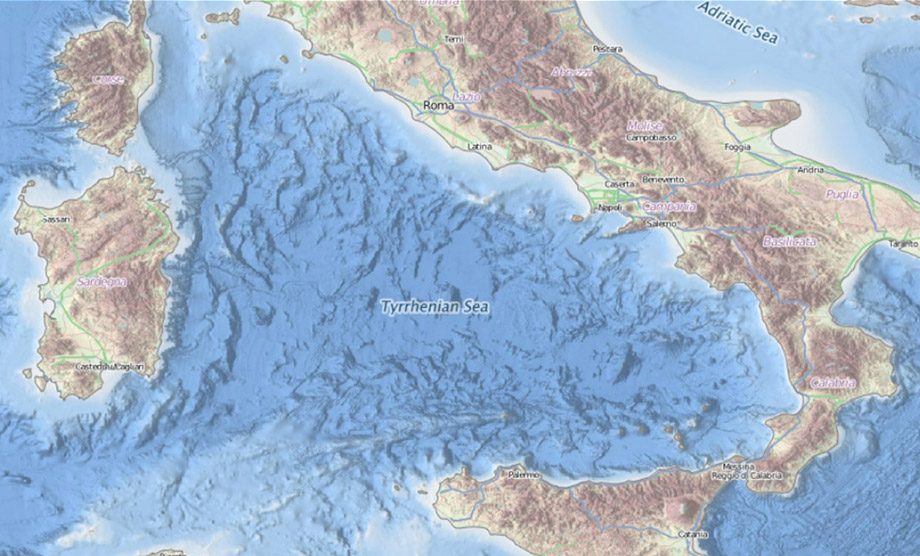
- GEBCO (external WMS layer):
The GEBCO 2014 layer is a predefined layer that uses an external WMS service. This layer is used as a bathymetry background for the area outside the EMODnet scope - Contours:
This layer shows the contours based on the average depth. The contours are shown for the following depths: 50, 100, 200, 500, 1000, 2000, and 5000 meter
The following information can be retrieved from the active depth layers by additional function buttons:
- Retrieve Depth tool:

Click on this button to activate the function to retrieve depth and related metadata for a specific point. Click on a spot within the EMODnet bathymetric area
- A pop-up window will appear showing the depth and the related metadata of the EMODnet grid point. Additional metadata of the survey or cDTM data used to generate the EMODnet grid point can be retrieved by clicking on Show metadata button in the pop-up window
- Be aware that for every Retrieve depth action a new pop-up window will be opened
- Note that only available metadata is shown for a given position
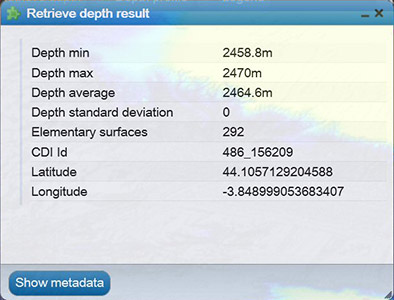
The pop-up windows displays metadata for the EMODnet grid cells: Depth Minimum for the grid cell, Depth Maximum, Depth, Depth Standard deviation, Number of interpolation values used for generating the grid cell value, Number of used elementary Surfaces. Depending on the position in the grid some values may not be populated.
Clicking on the Show metadata button will retrieve another pop-up window with the metadata of the indicated survey data set as included in the CDI Data Discovery and Access service OR the metadata of the indicated composite DTM as included in the Sextant Catallogue Service for Composite DTMs OR it links to the GEBCO portal.
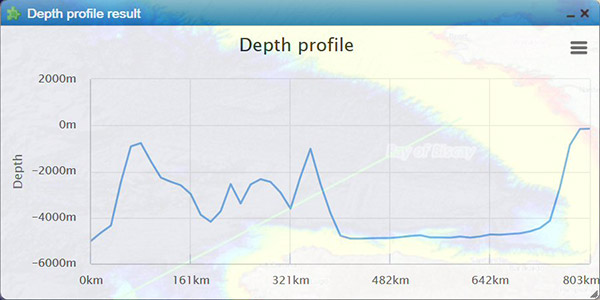
- Depth profile tool:

Click on this button to activate the function to retrieve a depth profile for a user defined transect.Click on a spot witin the EMODnet bathymetric area as starting point of the transect;
- Move the mouse to make the transect and click to make the second point of the transect;
- A depth profile will be generated for the defined transect. The user can download this transect image as PNG, JPEG, PDF or SVG vector image.
- Legend tool:

Click on the button to provide a pop-up window containing the legend for the visible depth layer.
The Source references layer
This layer depicts the most significant elementary surface used for generating the grid cell value. The minimum resolution for this layer is 5 EMODnet grid cells in order to prevent to much detail in this layer. For every 5 EMODnet grid cells the most significant elementary surface has been determined. All neighbouring source reference "points" with the same reference are represented by a single polygon. Every polygon has its own fill colour. All polygons referencing the same source have the same fill colour. Be aware that one colour is not referencing the same unique source, since this would require more than 6.000 different colours. The only exception is that a grey fill colour always references a GEBCO source.
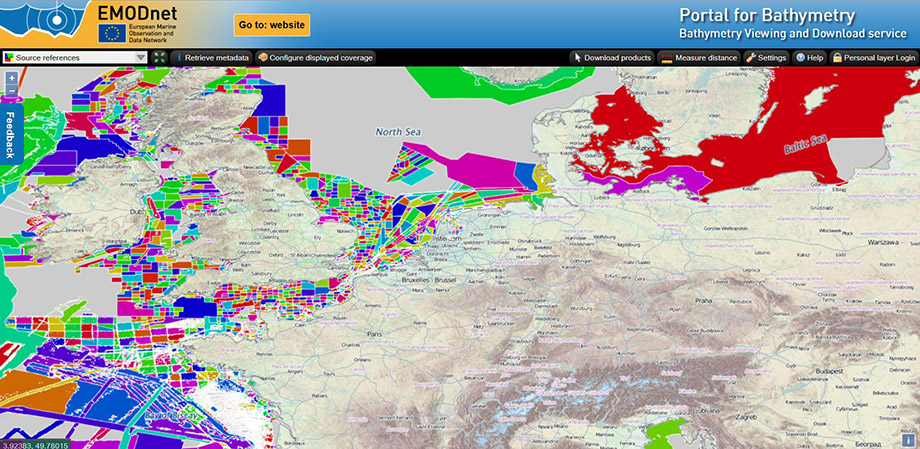
- Retrieve metadata tool:

Click on the button to activate it and then click on a spot on the sources references layer to retrieve the metadata pop-up page of the indicated survey data set (as described in the CDI Data Discovery and Access service) or Composite DTM (as described in the Sextant Catalogue service of Composite DTMs). The selected polygon will be highlighted. - Configure displayed coverage tool:

Click on the button will display a pop-up page with 2 sections: 1) to display the overall coverage of the EMODnet Bathymetry area by surveys (as described by CDI entries), by Composite DTMs (as described by Sextant entries) or by GEBCO 2014. The second section allows to browse the data providers that have contributed with surveys and Composite DTMs to the present version of the EMODnet Bathymetry with their individual contributions.
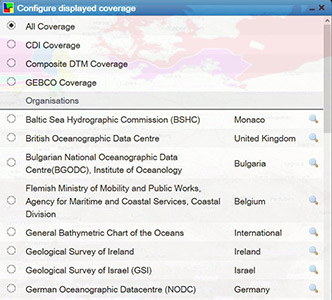
Click on the radio button in front of a name and this shows all used data contributions of that provider. Clicking on the maginifying glass gives a zoom in.
The Survey tracks / polygons layer
This layer is provided as WMS by the EMODnet Bathymetry CDI Data Discovery and Access service. It shows all survey tracks and polygons for which survey data is available in the service, and not only those that have been used for the EMODnet Bathymetry data product. Also this has a global coverage.
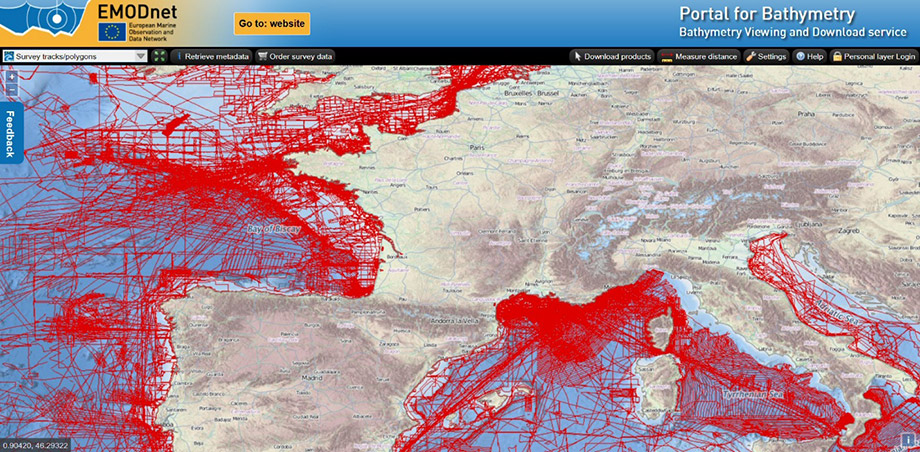
- Retrieve metadata tool:
Click on the button to activate it and then click on a track or in a polygon to retrieve the metadata pop-up page of the indicated survey data set as described in the CDI Data Discovery and Access service. In case there are multiple surveys at the same point, first a short table will be displayed with associated CDIs. Click on one will give the CDI detail page. - Order survey data:

Click on the button to activate it and then draw a lat - lon box on the map for which area you are interested to know more about the available surveys. This will open dynamically the CDI Data Discovery and Access service with the results of its search by the indicated lat - lon box. You can now examine all the metadata for the surveys of your choice and also can submit requests for accessing the actual survey data sets from their data providers by using the CDI shopping basket mechanism.
Download products
The Download products button is always visible and allows you to select and download EMODnet Bathymetry DTM tiles in various formats. Clicking on the button will display a grid of 16 tiles over the EMODnet Bathymetry area. Then clicking on one tile will open a pop-up window with a selection of download file types: EMODnet CSV, EMODnet NetCDF, both including the EMODnet data model and with or without GEBCO and interpolated (INT) gridcells, ESRI ASCII, GeoTiff, Fledermaus SD, and XYZ files.
The file types have the following specifications:
- EMODnet CSV files:
The CSV file is a comma separated file containing the following fields: Longitude, Latitude, Depth Minimum for the grid cell, Depth Maximum, Depth Average, Depth Standard deviation, Number of interpolation values used, Number of used elementary Surfaces, Average smoothed depth value, Offset of smoothed depth with respect to the average depth, CDI Identification (reference of the most significant survey used for this grid cell), DTM Identification (reference for the most significant DTM used for this grid cell) - NetCDF files:
The NetCDF file contains the same data as the CSV file and is compliant with the Network Common Data Form. The files have been optimised for use in the Geo-Seas 3D viewer. A copy of the Geo-Seas 3D viewer can be downloaded from the Geo-Seas website. - SD files:
The SD files can be viewed in the QPS 3D Fledermaus application or in the iView4D viewer, which is available as a free download - XYZ files:
The XYZ file is a comma separated file containing the following fields: Longitude, Latitude and Depth Average - Esri ASCII grids:
The Esri ASCII format contains the grid data in the ARC/INFO ASCII GRID format - GeoTIFF files:
The GeoTIFF file contains the multi colour as well as the single colour bathymetry data in the Geo Tagged Image File Format
Personal Layer
The Personal Layer offers registered users the ability to add their own data to the EMODnet portal. Data can be uploaded and visualised in a personal layer against the EMODnet data. Therefore user supplied high density data (multi-beam data) will be converted at the portal to the native EMODnet grid format with 1/8 arc minute resolution and thereafter be made available in a Personal Layer in the Layer Menu for viewing.
For "login" users must be registered in the SeaDataNet User Register.
After registering and logging in to the portal, two additional layers will appear in the drop down layer panel: A Personal Layer Source Reference and a Personal Layer DTM. Note that it may take some time to prepare the layers on the server.
The source reference layer will show the individual surveys as they are added to the Personal Layer. The DTM layer shows the resulting deconflicted DTM. The DTM uses a relative colour schema which differentiates it from the EMODnet layers.
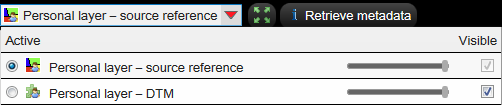
By using a different colour schema also data in relatively shallow water can be visualised clearly.
After activating the Personal Layer DTM layer, 4 additional buttons become available at the top of the screen: Retrieve depth, Depth profile, Download Esri grid and Download GeoTIFF. These functions operate on the data of the Personal Layer and have no interaction with the EMODnet layers.

Uploading new data
Before anything can be done with the Personal Layer, background data must be uploaded to the server. This is done by using the Import Data button that appears after login in. The button can be found next to the feedback button at the top of the screen. The button activates the Import screen:
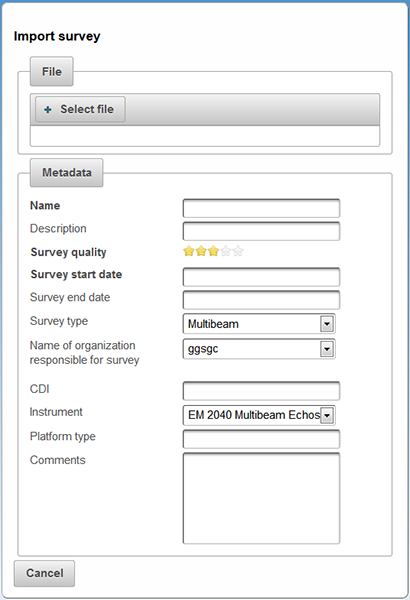
Select a local data file and upload it to the server. The file must comply to the Personal Layer specifications:
- Depths positive downwards (EMODnet convention)
- Format X Y Z (space delimited)
- X and Y as decimal degrees using - for West and South
- WGS84
Example:
3.67714259 51.43614336 20.26
3.67714074 51.43615053 20.45
3.67713604 51.43615702 20.55
3.67713505 51.43616412 20.59
3.67713408 51.43617111 20.58
3.67713066 51.43617798 20.32
3.67712715 51.43618332 20.19
3.67712393 51.43619208 20.12
etc.
The list with metadata fields is only intended to demonstrate the capabilities of the Personal Layer. The list can be extendended or modified in later versions of the portal. Only the Name, Survey start date en quality are mandatory. Note that CDI references must be valid entries. The reference is used to search for metadata in the CDI Data Discovery and Access service.
After uploading (high density) background survey data, the EMODnet Server processes the data. This may take some time depending on the size of the dataset. A coverage polygon is automatically generated for each file that is uploaded. Based on survey date and quality the survey is added to the Personal Layer DTM. Higher quality surveys have preference over lower quality. The survey start date is used in case of equal quality.
The status of the upload and processing process can be monitored in the status window that appears after the upload screen is closed.
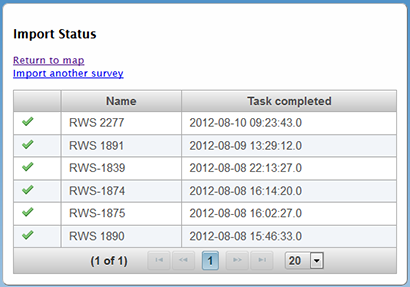
The status screen shows the current task and its status. An hourglass icon indicates that the server is processing the new upload. Previous uploads are also shown on the status screen.
By selecting "Return to map" the result can be visualised.
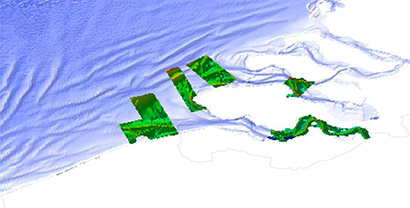
Example of a personal Layer DTM agains a single colour EMODnet background
WMS services
The EMODnet Bathymetry layers are also available as OGC compliant web services:
| WMS: | http://ows.emodnet-bathymetry.eu/wms |
| WFS: | http://ows.emodnet-bathymetry.eu/wfs |
| WMST: | http://ows.emodnet-bathymetry.eu/wmts |
Colophon
In addition to the data and products of EMODnet bathymetry partners use is made of the following sources:
- OpenStreetMap 2014 WMS services for land geography, coastline, borders and territorial waters
- GEBCO Sub-Committee on Undersea Feature Names (SCUFN) WMS - WFS services for gazetteer with names, generic feature type and geographic position of features on the sea floor
- European Electronic Navigational Charts (ENCs) for selection of wrecks
- Geofabrik Germany for WMS service masking sea on OpenStreetMap
Questions & Feedback
For questions and feedback please use the Feedback button of the portal. We would really like to know your findings and ideas on how the portal could be improved.
Configuration information
This help text is version 2.0 and released on 5 February 2015.
The Bathymetry Viewing and Download service is built and maintained by GGSgc and partners coordinated by MARIS and on behalf of the European Commission.